

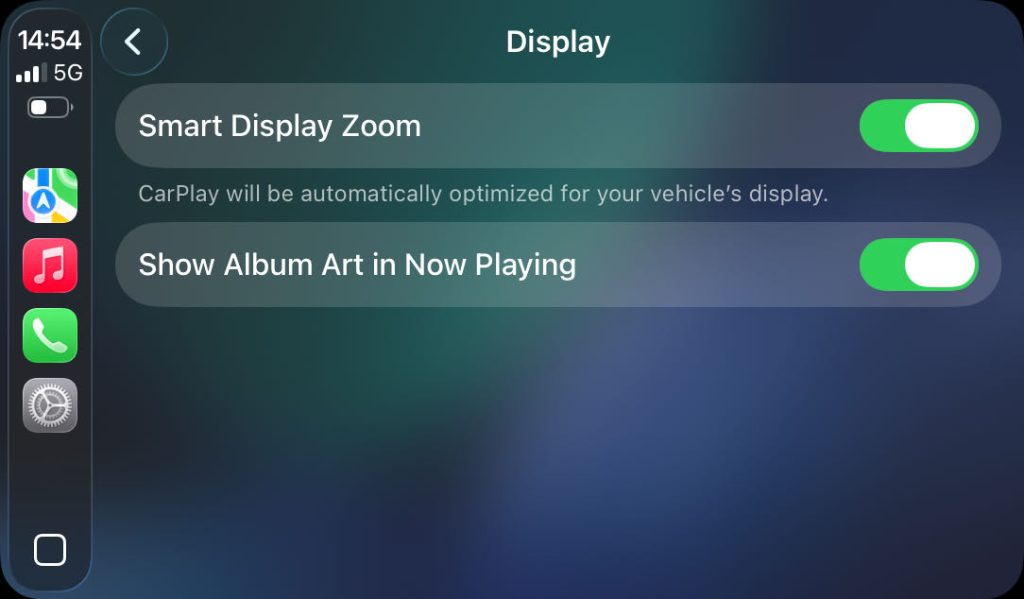
Apple will publish the new iOS version to iOS26. Some users may face UI issues in CarPlay after updated to the iOS26. The issue may like this picture. It is cause by a new feature in iOS26 which is called “Smart Zoom Display”.
We have packed a new version of firmware to solve this issue. Please kindly download and update the radio to the latest firmware to avoid this issue.
You can use the search function on the top-right of the website to find the correct firmware for your radio. You can follow this guide for search. The quick download link to the firmware list is on the end of this page. Or you can contact us directly to get the firmware. You can touch Home-Settings-About to get the current version number. Please tell us the current version number. Email: hqdservice@gmail.com
There is also a temporary solution for this issue if you don’t want to update the firmware or you can’t update the firmware. Just download and follow this guide to make the CarPlay display normally. Anyway, it is suggested to update the firmware.
- Touch the Setting icon in CarPlay screen. (You can swipe the screen left or right to find this icon)
- Touch the sixth line in the setting list.( It is called “Display”)
- Touch to disable the first setting option. (It is called “Smart Zoom Display”)(Note: This setting page will be displayed on the first time you connect CarPlay after updated to iOS26. So you can touch to disable it directly.)
- Then it can display well. (The screen may go to dark. The connection of the CarPlay might be cut and you may need to connect it manually again.)
Firmware Download Link Collection (updating)
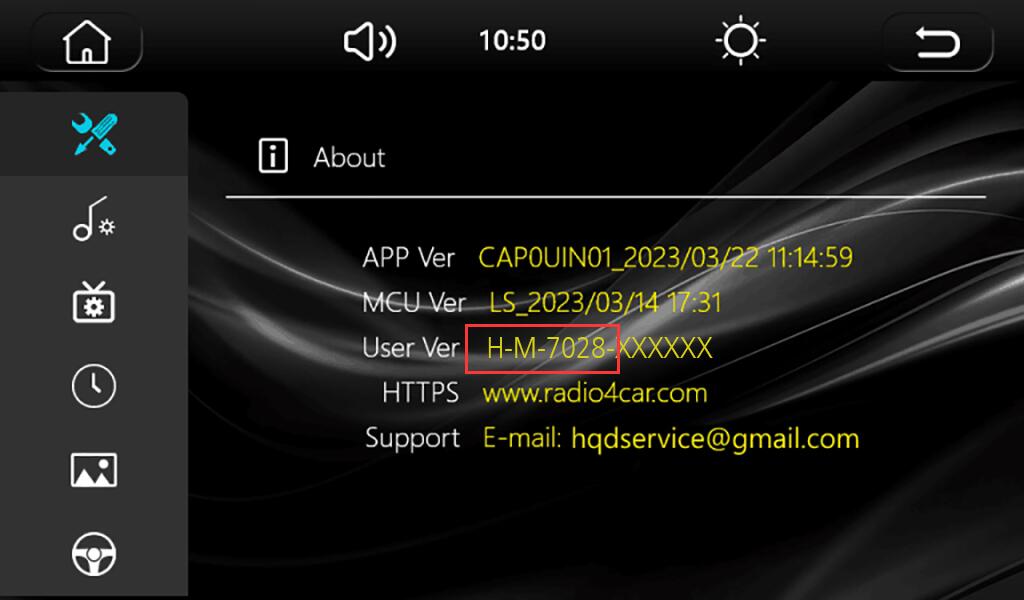
If you have already identified the version number of your radio, you can directly click here to download the firmware for your model(The prefix of the “User Ver” in “About page”, see the picture). The files in this site is the same with the file in the Google drive. The Google download link can bring you better download speed.
H-M series
H-H series
| Model | Update date | Downlod link (This site) | Download link (Google drive) | Remarks |
|---|---|---|---|---|
| H-H-7005 | 2025.08.05 | Click to Download | Click to Download | |
| H-H-7006 | 2025.08.05 | Click to Download | Click to Download | |
| H-H-7007 | 2025.08.05 | Click to Download | Click to Download | |
| H-H-7010 | 2025.08.05 | Click to Download | Click to Download | |
| H-H-7011 | 2025.08.05 | Click to Download | Click to Download | |
| H-H-7012 | 2025.08.05 | Click to Download | Click to Download | |
| H-H-7013 | 2025.08.05 | Click to Download | Click to Download | |
| H-H-7020 | 2025.08.05 | Click to Download | Click to Download | |
| H-H-7022 | 2025.08.05 | Click to Download | Click to Download | |
| H-H-7023 | 2025.08.05 | Click to Download | Click to Download | |
| H-H-7025 | 2025.08.05 | Click to Download | Click to Download |
H-L series
H series
| Model | Update date | Downlod link (This site) | Download link (Google drive) | Remarks |
|---|---|---|---|---|
| H-7005(15) | 2025.08.05 | Click to Download | Click to Download | |
| H-7006 | 2025.08.05 | Click to Download | Click to Download | |
| H-7008 | 2025.08.05 | Click to Download | Click to Download | |
| H-7010 | 2025.08.05 | Click to Download | Click to Download | |
| H-7011 | 2025.08.05 | Click to Download | Click to Download | |
| H-7012 | 2025.08.05 | Click to Download | Click to Download |
BMW screen series
| Model | Update date | Downlod link (This site) | Download link (Google drive) | Remarks |
|---|---|---|---|---|
| H-BMW-DSP25 | 2025.08.01 | Click to Download | Click to Download | |
| H-BMW-DSP88 | 2025.08.01 | Click to Download | Click to Download | |
| LST-BMW-DSP25 | 2025.08.05 | Click to Download | Click to Download | |
| LST-BMW-DSP88 | 2025.08.05 | Click to Download | Click to Download |
MA-M series
| Model | Update date | Downlod link (This site) | Download link (Google drive) | Remarks |
|---|---|---|---|---|
| MA-M-7005 | 2025.08.01 | Click to Download | Click to Download | |
| MA-M-7013 | 2025.08.01 | Click to Download | Click to Download | |
| MA-M-7018 | 2025.08.01 | Click to Download | Click to Download | |
| MA-M-7030-1 | 2025.08.01 | Click to Download | Click to Download | |
| MA-M-7030-2 | 2025.08.01 | Click to Download | Click to Download | |
| MA-M-7038 | 2025.08.01 | Click to Download | Click to Download | |
| MA-M-7040 | 2025.08.01 | Click to Download | Click to Download | |
| MA-H-7013X | 2025.08.05 | Click to Download | Click to Download |
Bonjour
Pouvez-vous m’envoyer un tutoriel pour mettre à jour CarPlay H-7005
Cordialement
Hi, all the firmware file contains the updating guide. Just download and update it.
Hi please can u send me a firmware fo tg LS-E46_UiN01 because i have a samsung s22 ultra in korea and the wireless android auto not working for me
Please kindly tell us the current version number.
j’aimerais avoir le firmware du modèle H-9001-DZ yzkong car je n’ai pas accès aux paramètres de l’auto radio et je n’arrive pas à accéder a Android auto
Please kindly tell us the current version number.
Bonjour
Pourriez vous m envoyer un logo Volkswagen s il vous plait?
Par contre quand je met dans lapplication auto, j ai aucune valeur?, porte ouverte, km/h, etc …
c est une vw golf 5 1.9 tdi 2004
CAP0UIN01_2025/08/01 18:15:43
_cfg:2025/02/17 2:03
LS_2025/02/17
H-M-7005-250801
Merci
Please download and update the firmware in this website directly. It contains the VW logo. As for the car information, it vary to the car models.
bello i tried to Install the new firmware, i ve followed the guide but the car stereo didnt accept the file with the message: “no support file”, i tried with two different usb stick formatted fat 32, i have a fiat 500 firmware model installed: h-m-7028-86-250423
Please kindly try the USB port on the back of the radio.
It does not work! I tried with the usb port in the back, it does not work, it still shows “no support file”
Hello, i updated from H-L-7005-250607 to newest H-L-7005-250915 and everything works fine for now. But now the boot screen changed to VW logo. Is it possible to change it somewhere? I have a SEAT and the logo looks out of place, would be nice to have possibility to change to other car brand or the general logo like old firmware had. BR Michael
Hi, you can follow this guide to change the booting logo. http://www.radio4car.com/wp-content/uploads/2025/08/Customizing-Personal-Logo_EN_FR_DE_IT_ES.pdf
Perfect thanks, will do that.
Hallo. Ich habe ein Display mit User Ver. LST-BMW-DSP-250702 .
Ich bräuchte dafür das Update.
Und ist es möglich das BMW Logo beim starten zu bekommen?
Gruß Christian
We have sent it to your email yesterday. You can also download it by this link. https://www.radio4car.com/firmware-lst-bmw-dsp25-250801/
Hello,
I have the MA-M-7040 and Fiat 500 from 2016 blue & me édition. I want to change the logo for Fiat. And I have the message “No CD” on my instrument panel. With the new firmware i don’t lost all the settings i made ?
http://www.radio4car.com/wp-content/uploads/2025/08/Customizing-Personal-Logo_EN_FR_DE_IT_ES.pdf
You can follow this guide to change the booting logo. The issue of the “NO CD” can’t be solved because of the disconnection of the original CD player.
Tenho um rádio com a versão H-M-7005-86-250301.
Se não tiver o celular emparelhado, funciona bem e não se desliga.
Quando troquei de celular para o IOS 26, quando tenho o CarPlay em funcionamento, por vezes o rádio desliga-se sozinho e antes não acontecia.
Quais são os passos a seguir para resolver o problema?
Existe algum guia de procedimentos?
Please kindly try to update the latest firmware.
I did the firmware download and i installed like the intructions and the radio turn off several times during the way but only when is paired with iPhone.
What can i do more?
How can i do that?
Can you explain the steps please?
You did not give me the answer so i Will send the radio for guarantee because it works incorrectly.
As we know that the new iPhone 17 series will face the issue of WiFi disconnecting. That will affect the connection of the CarPlay.
How can i fixed?
Hello. I also have an iPhone 17 Pro Max and have this issue since september now.
I tried EVERYTHING. New MCU version, New Firmware Version. Nothing works for more than 15 minutes.
Is there a fix? Other People with this issue have fixed it through Firmware updates from their aftermarket supplier.
It is extremly annoying…
Please reset the radio after updating. You can touch Home-Settings-Default to reset it. Then delete the Bluetooth name of the radio from your iPhone. Then reboot your iPhone. Then connect it again.
Hello!
We installed the radio without problems and it worked like a charm.
After some tries also the apple carplay worked (iPhone 15 with iOS 26) via WLAN.
But after switching to the 3rd UI option the connection via WLAN does not work anymore. We tried several things and also installed the latest firmware (for the H-M-7005). But we can‘t get it working again.
Reconnecting to WLAN and also Bluetooth didn‘t help.
Only car play works by connecting the phone via usb cable.
So what can we do? Any suggestions?
Thanks for a response.
Please kindly reset the radio first. You can touch Home-Settings-Default to reset it. Then delete the Bluetooth name of the radio from your iPhone. Then reboot the iPhone. Then connect it again.
Hello, I have the latest firmware (H-L-7005-250915) installed, and now for the fourth time, problem with Apple CarPlay with the iPhone 16 Pro (iOS 26). It just stops connecting to CarPlay and only connects to BT mode (music, calls, etc.) which is working fine.
This happens after 2-3 weeks, and then only a full reset of the connection (delete radio in Bluetooth and reset radio itself) fixes it. And every time I lose all settings from CarPlay and radio.
Is there any way to fix this?
BR Michael
Hello, I have similar problems and even more. I have an iPhone 15 Pro and wireless CarPlay doesn’t work at all for me, even with the new software. Likewise, the functionality of wired Apple CarPlay is only sporadic. Often, the entire radio freeze. Bluetooth works. In addition, only the front speakers work. The rear ones have no function. Please help.
BR Kevin
Please kindly take a photo of the current version number to our email HQDSERVICE@GMAIL.COM
Hola, tengo una H-7005(15) descargue el archivo para actualizarlo pero cuan seria el siguite paso me refiero a como lo actualizo media vez teniendo el archivo
Please unzip the file. You will get two files. The pdf file is the updating guide. Then BIN file is the firmware.
Hallo ich bräuchte bitte für: LST-BMW-DSP25-251010 ein Update.
Vielen Dank
This version is the latest version. There is no newer firmware for it.
Hello,
My firmware version is H-N-7005-251202. I just installed my new radio and it all works with my iPhone running iOS 26.2 but just want to be sure that I am not missing out in case there are some other fixes behind the scene… I don’t see H-N listed, please advise… Thank you!
The H-N series is the latest version. There is no firmware updating for it. We will upload the latest firmware when the new firmware available.
Bonjour pouvez vous m’envoyer le tutoriel pour mettre à jour le CarPlay H-L-1 7005
Merci
Please download the firmware. The updating guide was also packed in the zip file.
Serait il possible de mettre le logo Volkswagen au démarrage sur un modèle Linux
Merci d’avance
Of course you can. Please kindly downlaod the firmware by our website. It contains the booting logo.
My version is not in the list: H-N-7005-251010
Where is the update file for my radio?
Thanks
Please search for the keyword of “H-N-7005” in our website.
Hi I have Model H-7033.
Are there any updates available?
Please kindly search for the keyword of the “H-M-7033” or the “H-N-7033”. It depends on the version of your radio. You can touch Home-Settings-About to get it.
Can you instruct us on getting a remote shell on these devices admin/passwd and IP address?
H-BMW-DSP88
root: [admin]
password: [adminpasswd]
Thanks
No it doesn’t support this function.
Bonjour
Je ne trouve pas le modèle MA-N-7005
Comment puis-je faire la mise a jour si je ne le trouve pas
Merci
Please kindly search for the keyword of “MA-N-7005” on our website.